Just Ask…
It’s quick and easy to get your first Learnsmater course up and running
When teams need training, they need it fast. Long build times, external tools, and messy integrations slow everything down. This is exactly why Learnsmarter’s quizzes have become one of the most valuable features in onboarding: you can create, preview, and publish a quiz in minutes – all inside the CRM your teams already use.
There’s no context-switching, no manual syncing, and no separate systems to learn. If you know Salesforce, you already know how to build learning.
Why Learnsmarter Quizzes Are So Fast to Build
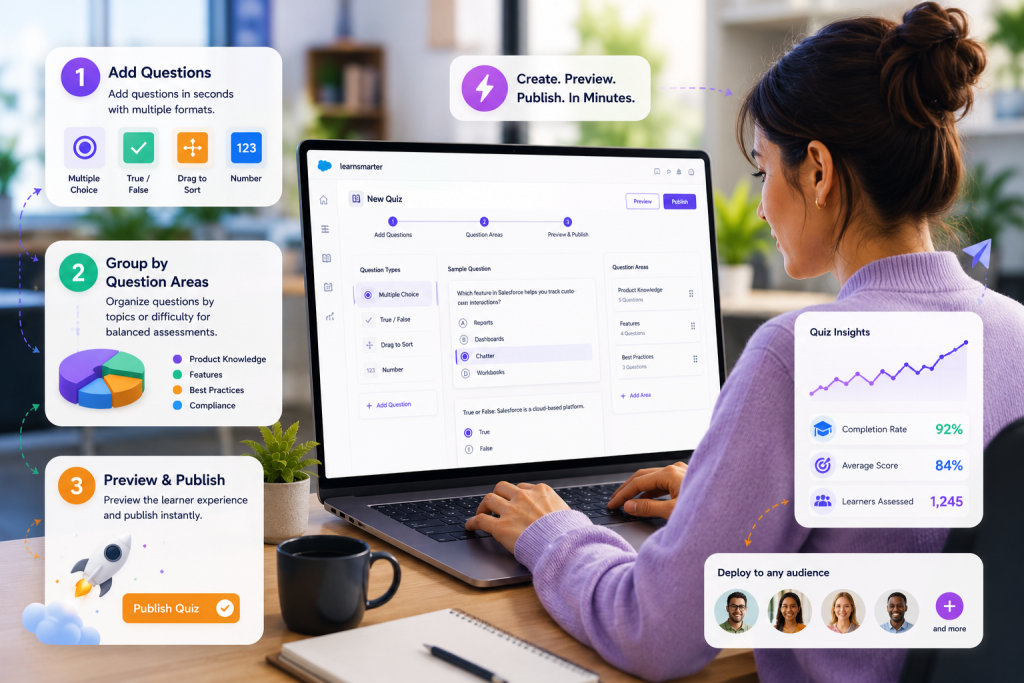
The quiz creation workflow is a few cimple fields and clicks.. Simply select “New Quiz,” add questions, group them into Question Areas, preview, and publish.
That’s it…
Everything happens on Salesforce Platform that you already recognise.
That means:
No connectors
No delays
No learning curve
You move from setup to ready-to-launch in a few clicks.
With just a few clicks, your first course can be up and running
Create your own Salesforce Quizzes in Three Steps
1. Add your questions quickly
Choose from multiple formats — multiple choice, true/false, drag-to-sort, or number fields. You can see all these options clearly in the Quiz Questions view.
2. Group questions by difficulty or topic
Learnsmarter’s “Question Areas” feature ensures every learner receives a balanced quiz. This goes far beyond simple randomisation. It delivers structured, fair, and consistent assessments.
3. Preview and publish instantly
Preview mode lets you check the learner experience before launching. When it’s ready, publish in one click – quiz live and ready.
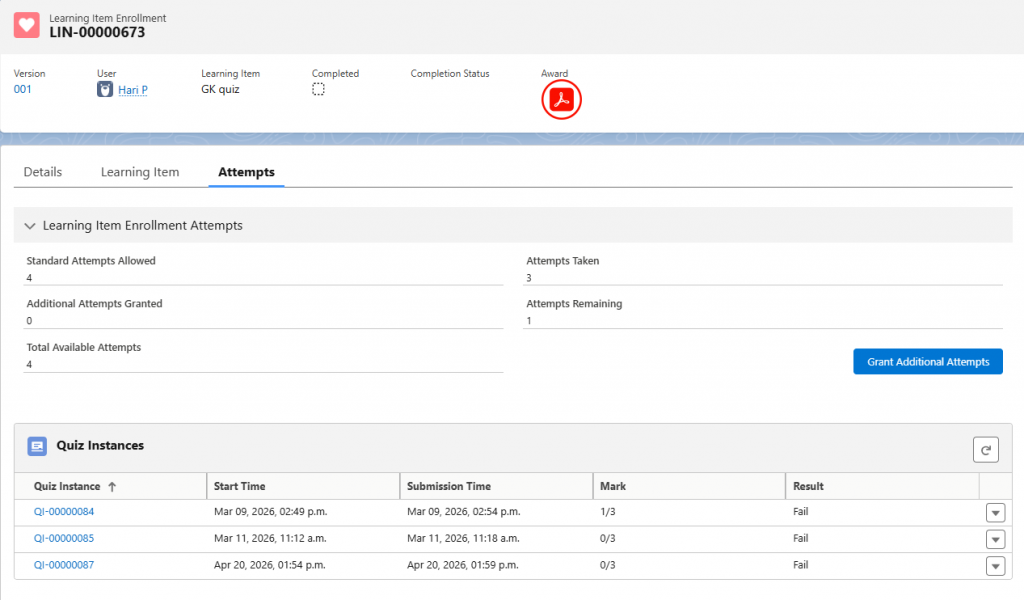
Further, we have also got Grant Additional Attempts which gives the internal user the ability to offer additional attempts individually without modifying anything for all the users.
Why Team leaders Love Super-Fast Learnsmarter Quizzes
Head of Sales
Speed matters during onboarding. Creating Salesforce quizzes fast means new hires are assessed from day one, and knowledge gaps surface instantly. Because everything lives in CRM, quiz results link directly to pipeline and performance metrics.
Head of Customer Success
Customer onboarding is all about rapid product adoption. Learnsmarter lets you launch quizzes to customers in Experience Cloud. This reduces repeat questions, cuts support volume, and validates understanding during training.
L&D Managers & HR Directors
Your success depends on measurable outcomes. With rapid quiz deployment, you can update assessments on the same day training changes. Plus, “Quiz Insights” show which topics need reinforcement and where to focus future learning.
“When customers come onboard, the first thing they react to is how fast they can get a quiz up and running.
They expect it to take hours and Learnsmarter shows them it takes minutes. It’s one of the moments in onboarding where people genuinely light up.”
Fast to Build. Faster to Deploy. A Better Way to Train in Salesforce.
Test knowledge instantly
Adapt learning paths at any time
Personalise training for each audience
Link quiz results directly to business KPIs
Deploy assessments to hundreds or thousands of users the same day
This is a powerful advantage of a true Salesforce-native LMS.
Build Complete Courses Just as Fast
Learnsmarter quizzes sit alongside video, SCORM, documents, and rich text
That means you can build an entire blended learning journey with the same speed and clarity:
Build
Preview
Publish
Assign
Track in real time