In a global business landscape, a “one-size-fits-all” approach to training often results in low engagement and irrelevant content. To truly empower your workforce, you must deliver personalised learning experiences that reflect the specific roles and regions of your team members. By using Subject Areas, you can transform a generic training portal into a curated, role-based journey that speaks directly to the learner’s needs.
Delivering the right learning content to the right audience is one of the biggest challenges organisations face when managing training at scale. Different teams, regions, and roles often require completely different learning journeys, yet the expectation is to provide a consistent and seamless user experience. This is where Subject Areas in Learnsmarter make a significant impact.
What are Subject Areas in a Salesforce Native LMS?
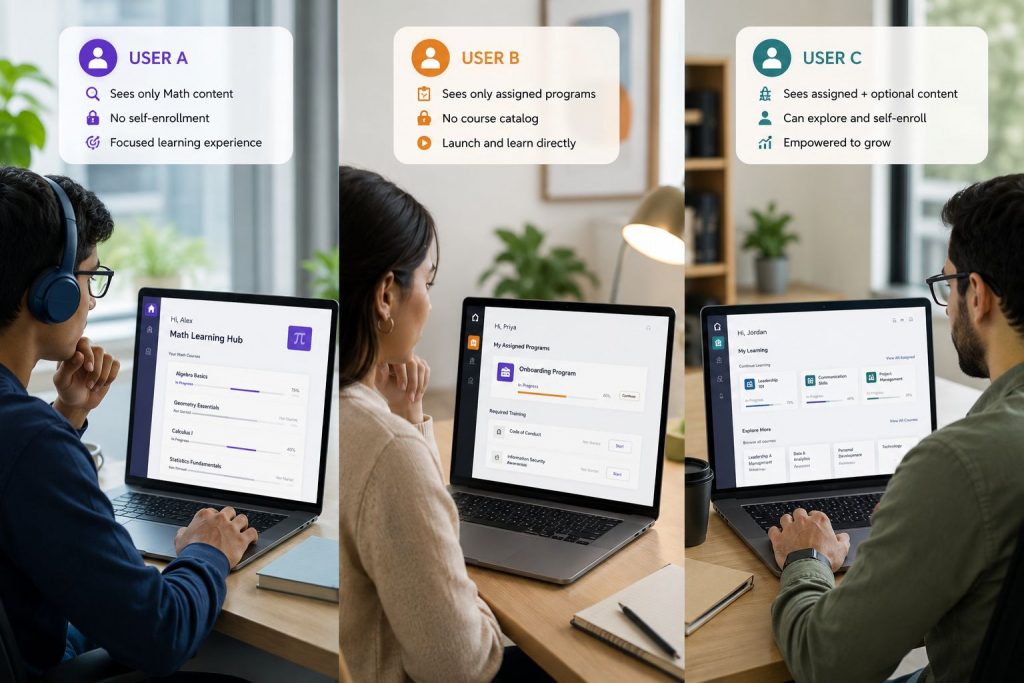
Subject Areas in Learnsmarter act as intelligent filters that control how learning content is organised and delivered to users. While all learners may access the same Experience Cloud site, what they actually see is tailored based on the Subject Areas assigned to them. In simple terms, Subject Areas ensure that two users from different groups do not see the same learning content unless it is explicitly intended. Each learner experiences a curated learning environment aligned to their role, region, or business function.
Understanding the Hierarchical Content Structure
A helpful way to think about Subject Areas is like a tree structure. A parent Subject Area represents a broader category, while child Subject Areas act as branches that further refine the content. This hierarchy allows administrators to organise learning in a logical and scalable way. For example, a global organisation may have a parent Subject Area for Sales, with child Subject Areas for regions such as EMEA, APAC, and North America. Each branch can then contain region-specific training content while still maintaining a unified structure.
Delivering Personalised Learning Experiences with Salesforce Data
Subject Areas play a key role in delivering personalised learning experiences within a Salesforce native LMS. By combining Subject Areas with visibility groups and user segmentation, organisations can ensure that:
- Learners only see content relevant to their role or department.
- Regional teams access location-specific training.
- Compliance courses are assigned based on regulatory requirements.
- External partners or customers receive tailored onboarding content.
As part of a Salesforce native LMS, Assessments in Learnsmarter integrate naturally with standard Salesforce features, user management, and reporting capabilities. This allows organisations to track learner progress, monitor assessment outcomes, and maintain a complete audit trail without relying on external systems.
Supporting Global and Multilingual Audiences
One of the most powerful use cases for Subject Areas is supporting global audiences. Organisations operating across multiple countries often need to deliver training in different languages. By leveraging Salesforce supported languages alongside Subject Areas, learning content can be filtered and delivered based on language preferences and regional requirements. For example, a learner in France can automatically access French learning content, while a learner in Germany sees German-specific materials, all within the same platform.
Extending Functionality with Salesforce Platform Capabilities
Because Learnsmarter is built as a Salesforce native LMS, Subject Areas can be further enhanced using the Salesforce platform. Administrators can extend functionality using:
- Salesforce Flows to automate assignment of Subject Areas based on user data.
- Custom fields to capture additional segmentation criteria.
- Validation rules to enforce governance.
- Reports and dashboards to track engagement by Subject Area.
This flexibility allows organisations to adapt the learning experience to their exact business requirements without relying on external systems.
Additional Use Cases
Subject Areas are highly versatile and can be applied across a wide range of scenarios:
• Role based learning for sales, service, or technical teams
• Partner and customer training with controlled content visibility
• Product specific training where each product line has its own learning path
• Certification programs with structured progression across levels
• Seasonal or campaign based training that is visible only for a defined audience
A Unified Yet Tailored Learning Experience
Subject Areas enable organisations to strike the perfect balance between consistency and personalisation. While all users access a single, unified platform, their learning experience is uniquely tailored to their needs. By organising content effectively and leveraging Salesforce capabilities, organisations can deliver targeted, scalable, and efficient learning experiences without complexity.
Subject Areas in Learnsmarter are more than just filters. They are a foundational feature that enables intelligent content delivery, supports global learning strategies, and enhances user engagement.
Combined with the power of Salesforce, they provide a flexible and scalable way to manage learning for diverse audiences, all within one platform.
Learnsmarter continues to empower organisations to simplify learning management while delivering meaningful and personalised learning experiences.
Stay on point with your content
Ready to deliver truly personalised learning experiences directly within Salesforce? Book your Learnsmarter demo today!